 BellReady
Your plans live everywhere
A paper planner, the LMS, your email, sticky notes and your memory. Something always slips, and it's never the small thing.
The digital teacher planner that builds your days, lessons, homework check-ins, seating charts and sub plans from your schedule. Open it in the morning and it shows you what today needs.
Sound familiar?
Your schedule is in the school portal. Lessons are in a Google Doc. Homework is on a sticky note. The grading deadline is in your head. Nothing talks to anything else, so you end up being the system.
A paper planner, the LMS, your email, sticky notes and your memory. Something always slips, and it's never the small thing.
Everything is fine on Tuesday. By Friday three classes turned in essays and your weekend is gone.
A fire drill, a pep rally, a snow day, and suddenly you're rewriting the rest of the week on the back of a worksheet.
How it works
Same week every week, Week A/B, or a rotating day cycle up to 19 days. Holidays and PD days are skipped automatically.
Paste your roster, give each class a color. That color follows it through the whole planner.
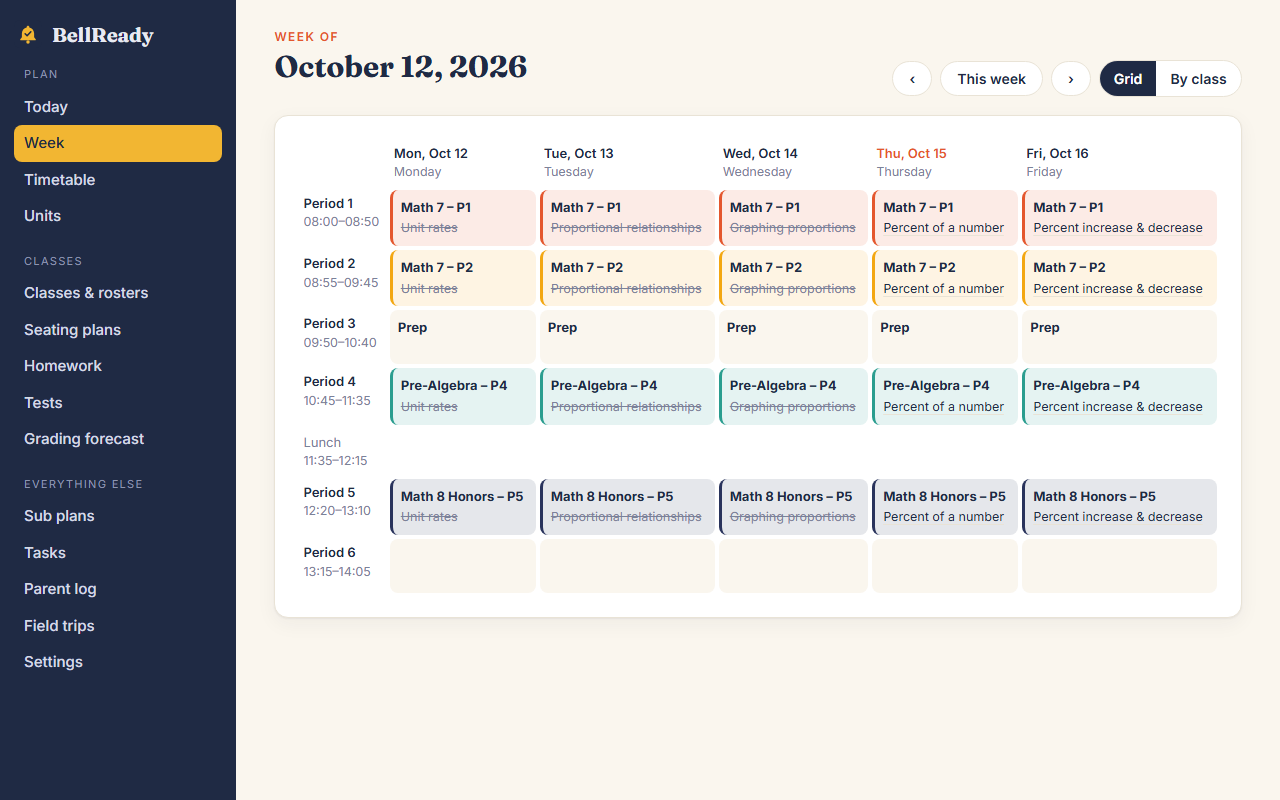
Tap each period and pick the class. Your Today view, weekly grid and sub plans build themselves from it.
What a paper planner can't do
Lost a period to an assembly or a lockdown drill? Every lesson you haven't taught slides to that class's next slot, in order. Taught lessons stay put, and you can undo it.
Roster size × minutes per paper. Spot the heavy week before it lands.
Check off names. One tap sends the missing ones to today's to-do list.
Pairs, table groups, round tables, testing rows, horseshoe. Seat everyone A–Z or shuffle in one click, then tap two desks to swap.
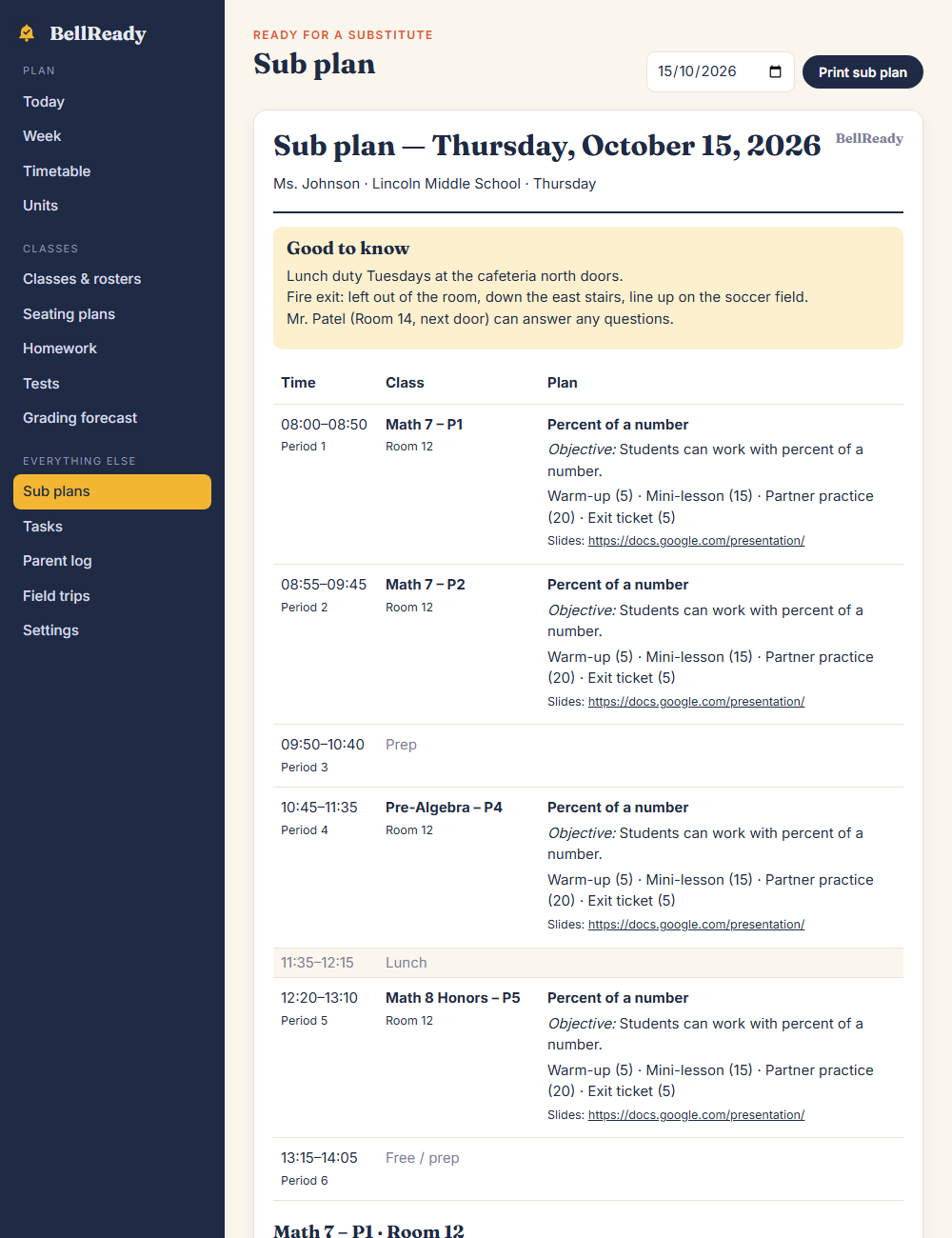
The day's schedule, rooms, lesson notes, resource links and seating charts with names, plus everything only you know about each class. Print it from bed.
One planner, three schedules
One class all day. Named blocks like Morning Meeting, Reading, Math and Specials, with every subject in one clear view.
Several sections across numbered periods. Class colors, prep periods and an optional Week A / Week B.
Day 1–Day 6, A/B days, or any cycle up to 19 days. It counts forward over weekends and breaks.
The rest of the job
Objectives, notes and a plan for every period, tagged to a unit.
Link Slides, Docs, Canva or Drive. Shows on your day and in the sub plan.
The week at a glance, or one class start to finish.
Standards per unit. Coverage counts itself from what you taught.
Average, range and spread update as you type.
Every section's color runs through the whole planner.
Full names, first names, initials, or numbers only.
Slips and payments for only the kids who are going.
Today, this week, this month, someday.
Calls, emails and conferences with follow-ups to check off.
Private by design
BellReady stores your planner in your own browser on your own device. We never receive it, so we can't lose it, sell it or read it. No ads, no tracking inside the planner, and a full backup whenever you want it.
BellReady is a planning tool, not a student information system. Keep IEP, medical and discipline records in your district's official systems.
Simple pricing
| Paper planner | PDF planner | Subscription apps | BellReady | |
|---|---|---|---|---|
| Builds days from your schedule | — | — | ✓ | ✓ |
| Rotating & A/B schedules | — | — | Some | ✓ |
| Reshuffle after a lost day | Eraser | Rewrite | Some | One tap |
| Grading forecast | — | — | — | ✓ |
| One-click sub plans | — | — | Some | ✓ |
| Works offline | ✓ | ✓ | Rarely | ✓ |
| Cost | $30–60 / yr | $10–25 / yr | $50–100 / yr | $19.90 once |
BellReady Planner
$19.90
one payment · yours for good
We just launched, so there are no teacher reviews yet, and we won't make them up. Click through the full demo with sample classes, then use BellReady for 30 days. If it doesn't save you time, email us and we'll refund every cent.
Questions
No. It's a web app: open the link in any browser and you're in. Add it to your home screen and it opens full-screen like any other app. Nothing to install and nothing to update.
Yes. It works in Safari and Chrome on iPad, iPhone, Android, Chromebook, Mac and Windows.
No. You pay $19.90 once and it's yours. Future updates are included.
Yes. Choose "rotating day cycle", enter how many days it has (2–19) and a date that was Day 1. BellReady counts school days from there and skips weekends and the holidays you list.
Both work. A/B days are a 2-day rotating cycle. Week A / Week B alternates whole weeks from a Monday you choose.
Yes. Add any link to a lesson. It shows on your Today view, in the weekly plan and in your sub plan so a substitute can open it too.
Tap Undo and every lesson goes back exactly where it was.
No. At setup you pick elementary and get named subject blocks (Morning Meeting, Reading, Math, Specials…) instead of numbered periods.
Your planner is stored only on your device. Nothing is uploaded to us. You can also display students as numbers only. Always follow your district's policies, and keep IEP, 504, medical and discipline records in official systems.
Go to Settings → Download backup, then Restore from file on the other device. Automatic cloud sync between devices is on our roadmap and will be free for existing customers.
Download a backup to keep your year's plans, then reuse your classes and units for next year. Your purchase doesn't expire.
Once it's opened once, it works offline, so a blocked network won't stop you. You can also use it on your phone over cellular.
Enter your schedule once, then spend the rest of the year reading your planner instead of rewriting it.
Instant access · Works offline · 30-day money-back guarantee